
Eliko RTLS: system and server components overview
Eliko RTLS high-level overview
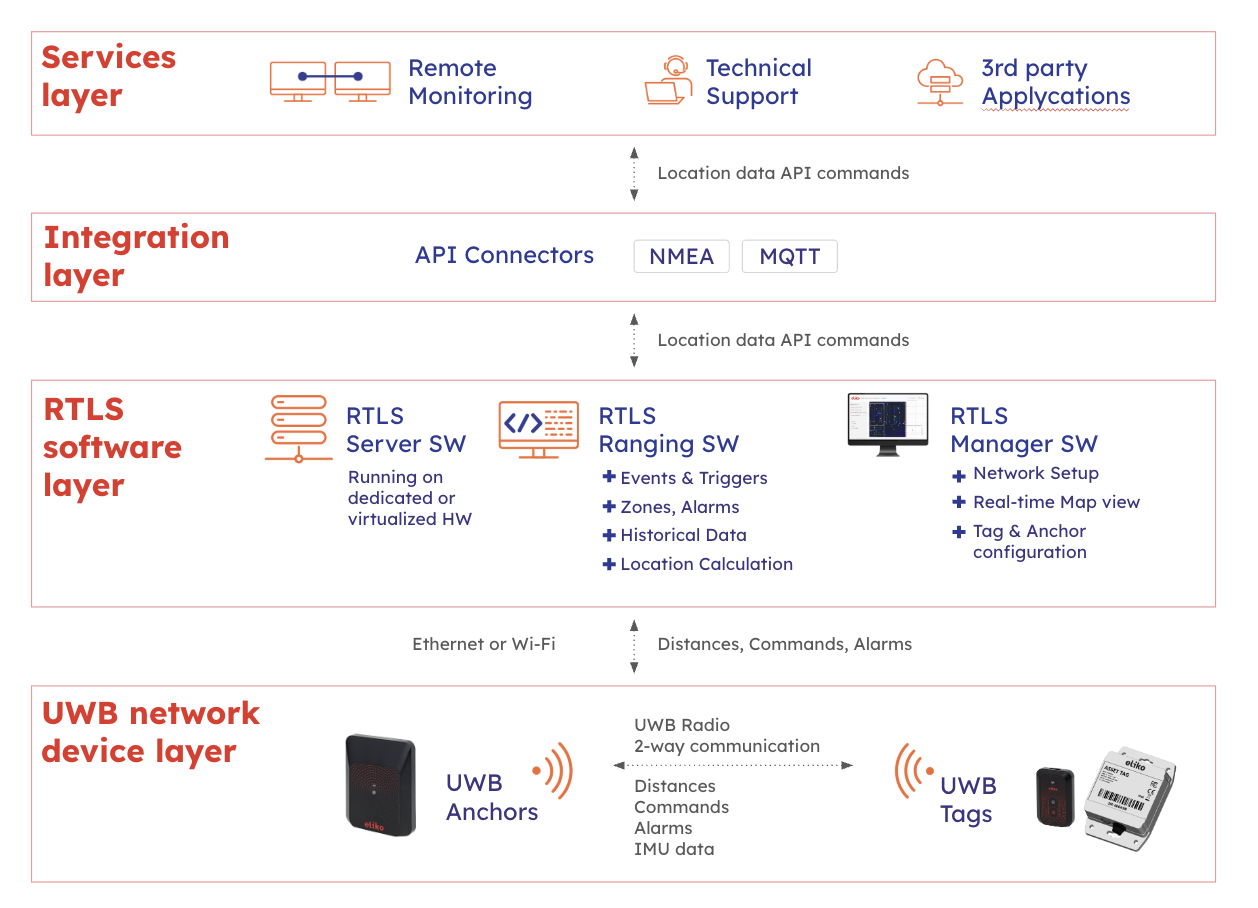
Eliko RTLS is a precise Real-Time Location System for tracking any object in 2D or 3D space. It uses Ultra-Wideband (UWB) radio waves for measuring distances between the basic hardware components – static anchors and mobile tags. In addition, the Eliko RTLS also includes the Server software components, such as Eliko RTLS Ranging software, which collects the distance measurement data from anchors and calculates the tag’s X, Y and Z coordinates. The most important output of the Eliko RTLS are the coordinates of tracked objects calculated by the Eliko RTLS Ranging Software. In most cases, clients integrate the Eliko RTLS with their own systems and use or analyze the data in a third party software.
A high-level view of the Eliko RTLS architecture is shown in the picture below, a more detailed description is given in the “SYSTEM OVERVIEW” section of the Eliko Knowledge Hub.
Eliko RTLS Server hardware
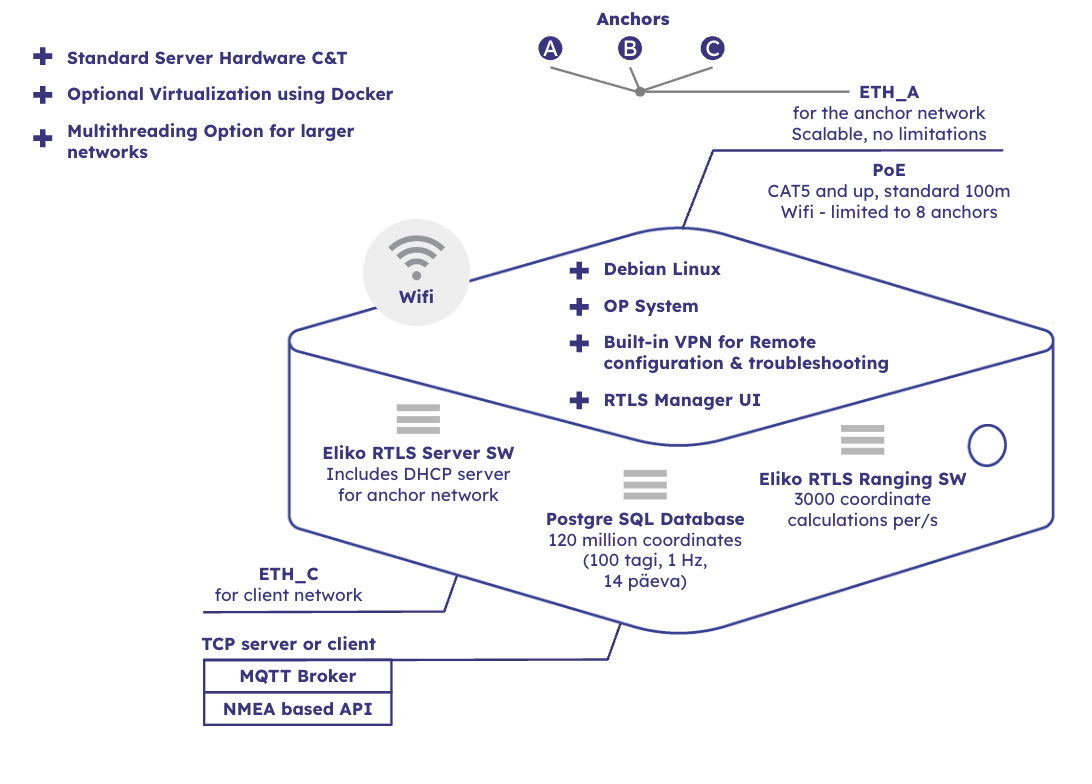
In its dedicated hardware implementation, Eliko RTLS Server machine is a Debian Linux industrial mini-computer with dual ethernet interfaces – one for the anchor network (ETH_A), the other for integration with the client’s system (ETH_C). Additionally, the RTLS Server machine includes an integrated Wi-Fi module, so connections to the RTLS anchors and/or to the client’s application logic may also be done wirelessly.
On ETH_A, the RTLS Server runs a DHCP server and leases IP addresses for everyone that ask for it. In the most common case, a PoE switch is connected to ETH_A port of the RTLS Server machine. The anchors will be connected to the PoE switch. The RTLS anchors, PoE switch(es), optional additional ethernet switches and cables make up the RTLS anchor network.
The RTLS Server machine has another ethernet port called ETH_C, which is meant for connecting the RTLS Server to the client’s network. ETH_C is configured to ask an IP address from an external DHCP server residing in the client’s network. It is the responsibility of client’s network administrator to configure their DHCP server in a way that leases an IP address for the RTLS Server.
In addition to the cable-based ETH_A and ETH_C network connections, the RTLS Server machine includes an integrated Wi-Fi module. The RTLS Server’s Wi-Fi network is logically connected to ETH_A network, so everyone connecting with this Wi-Fi obtains an IP address, leased by the DHCP server running on the RTLS Server.
Eliko RTLS Server software components
Besides the Debian Linux operating system, the RTLS Server includes the following software components:
-
Eliko RTLS Server Daemon (ERTLSSD) – this is a central software component developed by Eliko, which communicates with the anchors on one side, offers communication interface for external parties and uses the PostgreSQL database on the same system.
-
RTLS Ranging Software – The software component part of the Eliko RTLS Server responsible for location data calculation.
-
PostgreSQL Database – this is a place for keeping the RTLS Server’s configuration, as well as store the measurement data obtained from the RTLS anchors and tags. The database is considered internal to the RTLS and all the data traffic to and from it will be performed via ERTLSSD.
-
Eliko RTLS Manager Backend – this is a software component, which communicates with ERTLSSD from one side and external web browser from the other side.
The RTLS Server is also responsible for managing the anchor network, i.e. running a DHCP server, leasing the IP addresses, etc.
A high-level overview of the Eliko RTLS Server software architecture is given in the picture below. A more detailed description is given in “The Eliko RTLS Software Components and Services” chapter of the “SYSTEM OVERVIEW” section of the Eliko Knowledge Hub.
Connecting to the Eliko RTLS Server
There are the following ways to connect the user’s PC to the Eliko RTLS Server:
-
Direct Wi-Fi connection to the RTLS Server machine: to connect a Wi-Fi enabled laptop, which is located close enough to the RTLS Server machine, the easiest way is using the wireless network provided by the RTLS Server. The name of this network may be Eliko-RTLSS-BS-XXXX, KIORTLSS-BS-XXXX or KIORTLSS-AP- XXXX, where XXXX is a 4-digit number which is unique among all the RTLS Server machines. Just look this network up on your laptop and create a connection to it. This connection is protected by a password, which can be found as a sticker on the bottom of the RTLS Server machine. NB! Please note that on some operating systems, a laptop will assume it gets internet access through this Wi-Fi connection, which is not true. After clicking “connect” on the laptop, it may be shown for quite a long time that establishing the connection is still in progress, while the connection is actually created with a couple of seconds. This means it would be OK to verify the connection just a couple of seconds after clicking the “connect” button, without waiting for the progress indicator to finish. The DHCP server running in the RTLS will allocate an IP address from the anchor network subnet to the user PC. The RTLS Server should be accessible via IP 10.8.4.1 by default.
-
Direct Ethernet cable connection to the anchor network: if the RTLS anchors are connected via Wi-Fi, the Anchor Network port of the RTLS Server machine (“ETH_A”) is empty and a simple ethernet cable may be used to connect the PC. If the Anchor Network port of the RTLS Server machine is already occupied by a network switch, then the user PC should be connected behind any switch residing in the Anchor Network. Please note that PoE functionality is not required for connecting a PC, so you can also use a non-PoE port for this connection. As in case of connecting via the RTLS Server machine’s Wi-Fi, the DHCP server running in the RTLS will allocate an IP address from the anchor network subnet to the user PC. The RTLS Server should be accessible via IP 10.8.4.1 by default.
-
Direct Ethernet cable connection to the client network: it is also possible to connect a PC directly to the Client Network port (“ETH_C”) of the RTLS Server machine, but this connection may be more complicated to configure. The Client Network interface expects an external DHCP server to lease an IP address to the RTLS Server. Therefore, the user needs to open the admin panel of their network router to find the IP address leased to the RTLS Server. NB! The same considerations should be taken if the IP address has been assigned statically to the RTLS Server in the user’s network.
-
Indirect connection: if the RTLS Server’s client network port (“ETH_C”) is connected to the user’s network router and the user’s network has a DHCP server running, a user can also access the RTLS Server from their PC connected to the same local network without connecting it directly to the Client Network (“ETH_C”) port of the RTLS server machine. As in the previous case, the user needs to open the admin panel of their network router to find the IP address leased to the RTLS Server. NB! The same considerations should be taken if the IP address has been assigned statically to the RTLS Server in the user’s network.
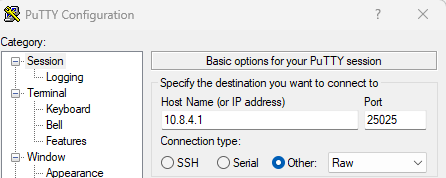
To use the Eliko RTLS Communication Protocol API commands, a user needs to establish a connection from their PC to the TCP port 25025 of the Eliko RTLS Server via a terminal with command line interface, e.g. PuTTY. Please note that the connection type should be set to “Raw” and no password is needed. As mentioned above, the IP address of the RTLS Server can be set depending on the connectivity between the user PC and the RTLS Server:
-
If the user PC is connected directly to the RTLS Server machine either via its anchor network Ethernet port (ETH_A) or Wi-Fi, the local IP address 10.8.4.1 of the anchor network subnet should be used (see the details in the picture below)
-
In all other cases the IP address of the RTLS Server needs to be looked up in the admin panel of the user’s network router
After establishing a connection to the Eliko RTLS, the user can communicate with the system via the API messages of the Eliko RTLS Communication Protocol.
Eliko RTLS Communication Protocol
Protocol overview
The Eliko RTLS Server software component responsible for communication with anchors and external parties is called Eliko RTLS Server Daemon (ERTLSSD). It communicates with external parties via raw TCP sockets. Multiple parallel connections are allowed and ERTLSSD can take both the TCP Server and Client roles, even simultaneously. The table below outlines the attributes for those connections:
|
|
ERTLSSD acting as TCP server |
ERTLSSD acting as TCP client |
|
General overview |
ERTLSSD listens incoming TCP connections on port 25025. Multiple parallel connections are allowed to this port. Whenever possible, Eliko recommends to use this as a way of communicating with ERTLSSD. |
Additionally, up to one outbound TCP connection can be configured for ERTLSSD. This interface can be enabled or disabled by using the SET_OUTPUT_PARAMS request, as well as to configure the destination IP address and TCP port to connect. The status of the interface may be queried by GET_OUTPUT_PARAMS request. This type of connection may be useful in case the RTLS Server is located behind a firewall, which does not allow external connections to it. |
|
Initialization and reconnection |
External party creates a TCP connection to ERTLSSD and is responsible for implementing a reconnection mechanism to cope with possible network errors. |
When this interface is enabled, ERTLSSD creates a TCP connection to pre-defined destination port. In case the connection is lost, ERTLSSD is responsible for creating a new connection. |
|
Initial state after connection has been established |
After the connection has been established, ERTLSSD does not send out any data automatically. To request live positioning data on this connection, the external party can use the SET_REPORT_LIST request. |
After the connection has been established, ERTLSSD automatically starts to send live positioning data to the destination TCP port. The live feed is comprised of the RR_L and COORD_E reports. Note that this data will be sent only in case there is any live positioning data present, which implies the system is up and running, anchors are configured and connected and at least one tag is switched ON and in range. To stop sending live positioning data or change the type of received reports, the external party can use the SET_REPORT_LIST request. |
No matter which party initiated the TCP connection, the communication protocol is the same. The protocol is based on sentences in NMEA format, which are essentially human readable lines of text, where newline characters separate the data packets.
The NMEA data packets used in Eliko RTLS are proprietary and defined by Eliko. Depending on the type and purpose of a specific NMEA data packet, it may be called a “request”, “response” or “report”. The data packets used in Eliko RTLS will be described below in separate chapters of this document.
The external software is considered to be the controlling body, which issues requests and expects responses from the RTLS Server. Note that for some requests, there may be several response packets. Additionally, the controlling software may switch ON automatic status reports, which may appear in the TCP connection anytime. As described in the table above, when ERTLSSD acts as a TCP client, some of these automatic status reports are ON by default. In case any of the automatic reports are used, the controlling software should cope with them, even in case they appear between another request-response sequence.
The RTLS Server software processes the incoming requests sequentially in one thread, even in case they arrive from different simultaneously open TCP connections. The developer of client software should still be aware that when sending simultaneous contradicting requests, the result might not be what was expected.
Protocol format
The protocol for controlling and monitoring the RTLS Server consists of NMEA sentences of three types: requests, responses and reports. Newline characters separate the data packets (NMEA sentences) and each packet itself contains a comma-separated list of fields. An example data packet would be like this:
$PEKIO,COORD,123,0x003F4A,10,10,0,,1563453225\r\n
-
Each data packet starts with $PEKIO
-
The second field is the packet identifier, which defines the purpose of the packet (in the example above, “COORD” is the packet identifier).
-
The following fields depend on the packet identifier.
-
Though the NMEA standard allows optional checksum, the RTLS Server software currently does not support it.
-
For output data packets, the RTLS Server software uses Windows-style newlines (“\r\n”). When parsing the input commands, the first “\r” or “\n” character terminates the current command and the following “\r” and “\n” characters will be ignored. It is advised to implement external software in a similar way.
For numerical fields, the RTLS Server software internally keeps them as integers. This means 5 and 005 are considered the same. The developer of external software should also treat numerical fields in a way that leading zeroes would not cause any problems.
For hexadecimal values, the RTLS Server software accepts both uppercase and lowercase letters. This means “A”, “B”, “C”, “D”, “E” and “F” are considered the same as “a”, “b”, “c”, “d”, “e” and “f”. For output data packets, the system uses uppercase letters for hexadecimal values, but it would be a good practice for the developer of external software to accept them in both upper and lower case.
The supported requests, responses and reports are described in the next chapters of this document. Please note that in these chapters, the “\r” and “\n” characters that terminate the NMEA sentences are omitted for brevity. In actual TCP connection, all the NMEA sentences shall be terminated with these newline characters.
General error messages
CANNOT_UNDERSTAND
In case the system receives a request with unrecognized or unsupported packet identifier, it responds with the following:
$PEKIO,CANNOT_UNDERSTAND
WRONG_NUMBER_OF_PARAMETERS
From RTLS Server software 2.6.0, there is another general error message. When the software receives a request with wrong number of parameters, the following response is sent:
$PEKIO,NOT_GOOD,WRONG_NUMBER_OF_PARAMETERS\r\n
Note that for all commands having a fixed number of parameters, this check is made in the very beginning of the parsing process, so some of the previous specific error messages are masked out from software version 2.6.0. For more complicated requests having a variable number of parameters, the system still relies on the error messages specific to the request.